In the rapidly evolving world of IT and cloud computing, Infrastructure as Code (IaC) has emerged as a transformative approach that allows organizations to automate their infrastructure management. By treating infrastructure configuration and management as software code, teams can achieve greater efficiency, consistency, and reliability in their deployments. In this article, we’ll explore the fundamentals of Infrastructure as Code, its benefits, and best practices to ensure you achieve real results in your automation efforts.
What is Infrastructure as Code?
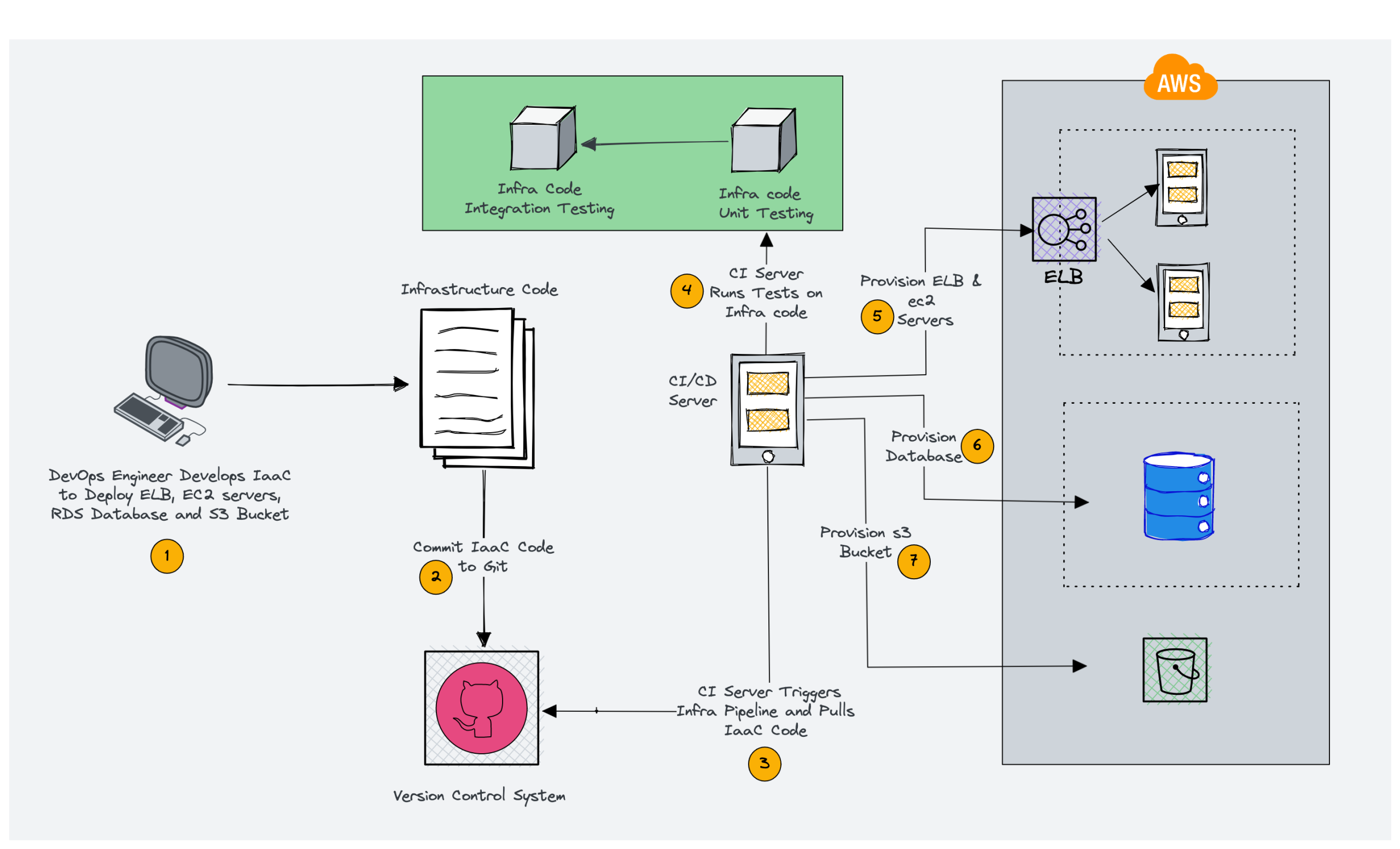
Infrastructure as Code (IaC) is the approach of defining and provisioning your computing environment using machine-readable files instead of manual hardware setups or GUI-based tools. This approach allows developers and operations teams to define their infrastructure in code, enabling automated deployment, scaling, and management of resources across various environments.
Key Components of IaC
- Configuration Files: IaC utilizes configuration files written in declarative or imperative languages to define infrastructure components, such as servers, networks, and storage.
- Version Control: Just like application code, infrastructure code can be stored in version control systems (e.g., Git), giving teams the ability to audit changes, collaborate seamlessly, and return to prior versions when required.
- Automation Tools: Various tools and frameworks, such as Terraform, Ansible, Puppet, and Chef, facilitate the automation of infrastructure provisioning and management.
Benefits of Infrastructure as Code
Implementing Infrastructure as Code offers numerous advantages:
1. Consistency and Reproducibility
With IaC, infrastructure configurations are defined in code, ensuring that environments can be replicated consistently. This reduces the risk of configuration drift and ensures that all environments—development, testing, and production—are uniform.
2. Speed and Efficiency
Automating infrastructure provisioning accelerates deployment times. Teams can quickly spin up new environments, allowing for faster development cycles and quicker time-to-market for applications.
3. Improved Collaboration
IaC fosters collaboration between development and operations teams (DevOps) by providing a common language for defining infrastructure. This alignment improves communication and reduces misunderstandings.
4. Version Control and Auditability
By storing infrastructure code in version control systems, teams can track changes over time, facilitating audits and compliance. This visibility helps identify when changes were made and by whom.
5. Cost Management
Automated infrastructure management allows for better resource utilization and scaling. Teams can provision resources on-demand, optimizing costs and reducing waste.
Best Practices for Implementing Infrastructure as Code
To maximize the benefits of Infrastructure as Code, consider the following best practices:
1. Use a Declarative Approach
Adopt a declarative approach to define your infrastructure. This means specifying the desired state of your infrastructure rather than detailing the steps to achieve that state. Tools like Terraform and AWS CloudFormation use this approach, allowing you to focus on what you want rather than how to get there.
2. Organize Your Code Effectively
Structure your IaC code in a way that promotes readability and maintainability. Use clear naming conventions for files, directories, and resources. This makes it easier for team members to understand and contribute to the codebase.
3. Leverage Modules and Reusability
Create reusable modules for common infrastructure components. This promotes consistency and reduces duplication, making it easier to manage changes across multiple environments.
4. Implement Version Control
Store your IaC scripts in a version control system like Git. This enables tracking of changes, collaboration among team members, and the ability to roll back to previous configurations if needed.
5. Test Your Infrastructure Code
Incorporate testing into your IaC workflow. Use tools like Terraform’s terraform plan or kitchen-ansible to validate your configurations before deploying them. This helps catch errors early and ensures that your infrastructure behaves as expected.
6. Document Your Code
Provide clear documentation for your IaC scripts. Include comments within the code and maintain separate documentation that explains the purpose of each module and configuration. This aids onboarding new team members and enhances collaboration.
7. Monitor and Audit Changes
Implement monitoring and auditing processes to track changes to your infrastructure. Use tools that provide visibility into infrastructure changes and alert you to any unauthorized modifications.
8. Embrace Continuous Integration/Continuous Deployment (CI/CD)
Integrate your IaC workflows with CI/CD pipelines. This allows for automated testing and deployment of infrastructure changes alongside application code, ensuring that your infrastructure evolves in sync with your applications.
Conclusion
Infrastructure as Code is a game-changer for modern IT operations, allowing organizations to automate and manage their infrastructure efficiently and reliably. By adopting best practices such as using a declarative approach, organizing code effectively, and implementing version control, teams can achieve real results in their automation efforts. Embrace IaC as a fundamental part of your infrastructure management strategy, and unlock the full potential of your cloud and on-premises environments. With the right practices in place, you’ll not only streamline your operations but also foster a culture of collaboration and innovation within your organization.